Archives AI News

Dust Bunny is a family-friendly horror from the creator of Hannibal

unnamed 1

When you have children of different ages, finding stuff to watch together can be a big challenge. Both of my kids - aged 10 and 12 - have a budding interest in horror, and there's not a lot of scary stuff that's appropriate for all of us. That's why I was pleasantly surprised while watching […]

Machine Learning Tests Keep Getting Bigger

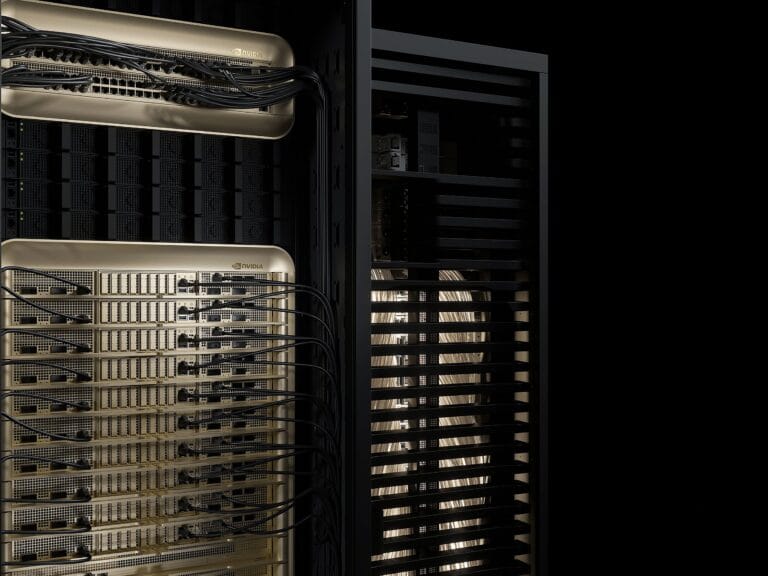
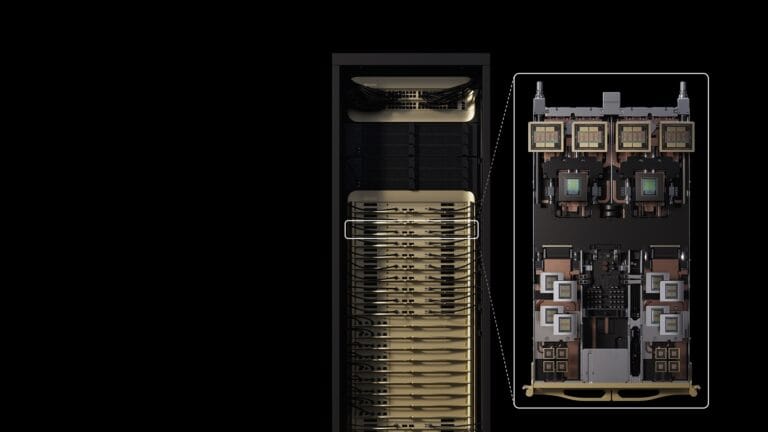
close up of two racks of gold and black computers racks with black and gold wiring connecting the computers

The machine learning field is moving fast, and the yardsticks used measure progress in it are having to race to keep up. A case in point, MLPerf, the bi-annual machine learning competition sometimes termed “the Olympics of AI,” introduced three new benchmark tests, reflecting new directions in the field.“Lately, it has been very difficult trying to follow what happens in the field,” says Miro Hodak, AMD engineer and MLPerf Inference working group co-chair. “We see that the models are becoming progressively larger, and in the last two rounds we have introduced the largest models we’ve ever had.”The chips that tackled these new benchmarks came from the usual suspects—Nvidia, Arm, and Intel. Nvidia topped the charts, introducing its new Blackwell Ultra GPU, packaged in a GB300 rack-scale design. AMD put up a strong performance, introducing its latest MI325X GPUs. Intel proved that one can still do inference on CPUs with their Xeon submissions, but also entered the GPU game with an Intel Arc Pro submission.New BenchmarksLast round, MLPerf introduced its largest benchmark yet, a large language model based on Llama3.1-403B. This round, they topped themselves yet again, introducing a benchmark based on the Deepseek R1 671B model—more than 1.5 times the number of parameters of the previous largest benchmark.As a reasoning model, Deepseek R1 goes through several steps of chain-of-thought when approaching a query. This means much of the computation happens during inference then in normal LLM operation, making this benchmark even more challenging. Reasoning models are claimed to be the most accurate, making them the technique of choice for science, math, and complex programming queries.In addition to the largest LLM benchmark yet, MLPerf also introduced the smallest, based on Llama3.1-8B. There is growing industry demand for low latency yet high-accuracy reasoning, explained Taran Iyengar, MLPerf Inference task force chair. Small LLMs can supply this, and are an excellent choice for tasks such as text summarization and edge applications.This brings the total count of LLM-based benchmarks to a confusing four. They include the new, smallest Llama3.1-8B benchmark; a pre-existing Llama2-70B benchmark; last round’s introduction of the Llama3.1-403B benchmark; and the largest, the new Deepseek R1 model. If nothing else, this signals LLMs are not going anywhere.In addition to the myriad LLMs, this round of MLPerf inference included a new voice-to-text model, based on Whisper-large-v3. This benchmark is a response to the growing number of voice-enabled applications, be it smart devices or speech-based AI interfaces.TheMLPerf Inference competition has two broad categories: “closed,” which requires using the reference neural network model as-is without modifications, and “open,” where some modifications to the model are allowed. Within those, there are several subcategories related to how the tests are done and in what sort of infrastructure. We will focus on the “closed” datacenter server results for the sake of sanity.Nvidia leadsSurprising no one, the best performance per accelerator on each benchmark, at least in the ‘server’ category, was achieved by an Nvidia GPU-based system. Nvidia also unveiled the Blackwell Ultra, topping the charts in the two largest benchmarks: Lllama3.1-405B and DeepSeek R1 reasoning.Blackwell Ultra is a more powerful iteration of the Blackwell architecture, featuring significantly more memory capacity, double the acceleration for attention layers, 1.5x more AI compute, and faster memory and connectivity compared to the standard Blackwell. It is intended for the larger AI workloads, like the two benchmarks it was tested on.In addition to the hardware improvements, director of accelerated computing products at Nvidia Dave Salvator attributes the success of Blackwell Ultra to two key changes. First, the use of Nvidia’s proprietary 4-bit floating point number format, NVFP4. “We can deliver comparable accuracy to formats like BF16,” Salvator says, while using a lot less computing power.The second is so-called disaggregated serving. The idea behind disaggregated serving is that there are two main parts to the inference workload: prefill, where the query (“Please summarize this report.”) and its entire context window (the report) are loaded into the LLM, and generation/decoding, where the output is actually calculated. These two stages have different requirements. While prefill is compute heavy, generation/decoding is much more dependent on memory bandwidth. Salvator says that by assigning different groups of GPUs to the two different stages, Nvidia achieves a performance gain of nearly 50 percent.AMD close behindAMD’s newest accelerator chip, MI355X launched in July. The company offered results only in the “open” category where software modifications to the model are permitted. Like Blackwell Ultra, MI355x features 4-bit floating point support, as well as expanded high-bandwidth memory. The MI355X beat its predecessor, the MI325X, in the open Llama2.1-70B benchmark by a factor of 2.7, says Mahesh Balasubramanian, senior director of data center GPU product marketing at AMD.AMD’s “closed” submissions included systems powered by AMD MI300X and MI325X GPUs. The more advanced MI325X computer performed similarly to those built with Nvidia H200s on the Lllama2-70b, the mixture of experts test, and image generation benchmarks.This round also included the first hybrid submission, where both AMD MI300X and MI325X GPUs were used for the same inference task,the Llama2-70b benchmark. The use of hybrid GPUs is important, because new GPUs are coming at a yearly cadence, and the older models, deployed en-masse, are not going anywhere. Being able to spread workloads between different kinds of GPUs is an essential step.Intel enters the GPU gameIn the past, Intel has remained steadfast that one does not need a GPU to do machine learning. Indeed, submissions using Intel’s Xeon CPU still performed on par with the Nvidia L4 on the object detection benchmark but trailed on the recommender system benchmark.This round, for the first time, an Intel GPU also made a showing. The Intel Arc Pro was first released in 2022. The MLPerf submission featured a graphics card called the MaxSun Intel Arc Pro B60 Dual 48G Turbo , which contains two GPUs and 48 gigabytes of memory. The system performed on-par with Nvidia’s L40S on the small LLM benchmark and trailed it on the Llama2-70b benchmark.


Automate app deployment and security analysis with new Gemini CLI extensions

Find and fix security vulnerabilities. Deploy your app to the cloud. All without leaving your command-line.  Today, we’re closing the gap between your terminal and the cloud with a first look at the future of Gemini CLI, delivered through two new extensions: security extension and Cloud Run extension. These extensions are designed to handle critical parts of your workflows with simple, intuitive commands: 1)  /security:analyze performs a comprehensive scan right in your local repository, with support for GitHub pull requests coming soon. This makes security a natural part of your development cycle. 2)  /deploy deploys your application to Cloud Run, our fully managed serverless platform, in just a few minutes.  These commands are the first expression of a new extensibility framework for Gemini CLI. While we'll be sharing more about the full Gemini CLI extension world soon, we couldn't wait to get these capabilities into your hands. Consider this a sneak peak of what’s coming next! Security extension: automate security analysis with /security:analyze  To help teams address software vulnerabilities early in the development lifecycle, we are launching the Gemini CLI Security extension. This new open-source tool automates security analysis, enabling you to proactively catch and fix issues using the /security:analyze command at the terminal or through a soon-coming GitHub Actions integration.  Integrated directly into your local development workflow and CI/CD pipeline, this extension: Analyzes code changes: When triggered, the extension automatically takes the git diff of your local changes or pull request. Identifies vulnerabilities: Using a specialized prompt and tools, Gemini CLI analyzes the changes for a wide range of potential vulnerabilities, such as hardcoded-secrets, injection vulnerabilities, broken access control, and insecure data handling. Provides actionable feedback: Gemini returns a detailed, easy-to-understand report directly in your terminal or as a comment on your pull request. This report doesn't just flag issues; it explains the potential risks and provides concrete suggestions for remediation, helping you fix issues quickly and learn as you go. And after the report is generated, you can also ask Gemini CLI to save it to disk or even implement fixes for each issue. Getting started with /security:analyze Integrating security analysis into your workflow is simple. First, download the Gemini CLI and install the extension (requires Gemini CLI v0.4.0+): code_block <ListValue: [StructValue([('code', 'gemini extensions install https://github.com/google-gemini/gemini-cli-security'), ('language', ''), ('caption', <wagtail.rich_text.RichText object at 0x3e9b94f5a370>)])]> Then you can start run your first scan: Locally: After making local changes, simply run /security:analyze  in the Gemini CLI. In CI/CD (Coming Soon): We're bringing security analysis directly into your CI/CD workflow. Soon, you’ll be able to configure the GitHub Action to automatically review pull requests as they are opened. This is just the beginning. The team is actively working on further enhancing the extension's capabilities, and we are also inviting the community to contribute to this open source project by reporting bugs, suggesting features, continuously improving security practices and submitting code improvements.  For complete documentation and to contribute, visit the official GitHub repository. Cloud Run extension: automate deployment with /deploy The /deploy command in Gemini CLI automates the entire deployment pipeline for your web applications. You can now deploy a project directly from your local workspace. Once you issue the command, Gemini returns a public URL for your live application. The /deploy command automates a full CI/CD pipeline to deploy web applications and cloud services from the command line using the Cloud Run MCP server. What used to be a multi-step process of building, containerizing, pushing, and configuring is now a single, intuitive command from within the Gemini CLI. You can access this feature across three different surfaces – in Gemini CLI in the terminal, in VS Code via Gemini Code Assist agent mode, and in Gemini CLI in Cloud Shell. Use /deploy command in Gemini CLI at the terminal to deploy application to Cloud Run Get started with /deploy: For existing Google Cloud users, getting started with /deploy is straightforward in Gemini CLI at the terminal: Prerequisites: You'll need the gcloud CLI installed and configured on your machine and have an existing app or use Gemini CLI to create one. Step 1: Install the Cloud Run extensionThe /deploy command is enabled through a Model Context Protocol (MCP) server, which is included in the Cloud Run extension.  To install the Cloud Run extension (Requires Gemini CLI v0.4.0+), run this command:  code_block <ListValue: [StructValue([('code', 'gemini extensions install https://github.com/GoogleCloudPlatform/cloud-run-mcp'), ('language', ''), ('caption', <wagtail.rich_text.RichText object at 0x3e9b94f5a340>)])]> Step 2: Authenticate with Google CloudEnsure your local environment is authenticated to your Google Cloud account by running: code_block <ListValue: [StructValue([('code', 'gcloud auth loginrngcloud auth application-default login'), ('language', ''), ('caption', <wagtail.rich_text.RichText object at 0x3e9b94f5a280>)])]> Step 3: Deploy your appNavigate to your application's root directory in your terminal and type gemini to launch Gemini CLI. Once inside, type /deploy to deploy your app to Cloud Run. That's it! In a few moments, Gemini CLI will return a public URL where you can access your newly deployed application. You can also visit the Google Cloud Console to see your new service running in Cloud Run.  Besides Gemini CLI at the terminal, this feature can also be accessed  in VS Code via Gemini Code Assist agent mode, powered by Gemini CLI,  and in Gemini CLI in Cloud Shell, where the authentication step will be automatically handled out of the box. Use /deploy command to deploy application to Cloud Run in VS Code via Gemini Code Assist agent mode. Building a robust extension ecosystem   The Security and Cloud Run extensions are two of the first extensions from Google built on our new framework, which is designed to create a rich and open ecosystem for the Gemini CLI. We are building a platform that will allow any developer to extend and customize the CLI's capabilities, and this is just an early preview of the full platform's potential. We will be sharing a more comprehensive look at our extensions platform soon, including how you can start building and sharing your own. Try Gemini CLI today, visit the GitHub here.

DJI’s next modular tiny action camera revealed in leaked images

dji osmo nano1

There’s been no official announcement from DJI yet, but leaked images appear to confirm a follow-up to the company’s modular and compact Action 2 camera that debuted in 2021, as spotted by Notebookcheck. The new DJI Osmo Nano takes a similar approach with accessories like a screen that attach using magnets, but the camera itself […]

Rubin CPX is Nvidia’s first GPU built specifically for massive-context AI applications

NVIDIA Vera Rubin NVL144 with Tray

Nvidia is planning a new class of GPU called Rubin CPX, designed specifically for the compute-heavy analysis phase in AI models. The strategy, known as split inference, is backed by new benchmark records from Nvidia’s Blackwell Ultra architecture, which uses a similar approach in software. The article Rubin CPX is Nvidia's first GPU built specifically for massive-context AI applications appeared first on THE DECODER.

How the new AirPods Pro compare to the rest of Apple’s AirPods lineup

Apple AirPods Pro 3 lifestyle 01 250909 big.jpg.large 2x

The iPhone Air may have been the star of the show, but Apple also announced a new pair of AirPods at its "Awe dropping" event on September 9th. The AirPods Pro 3 arrive three years after the second-generation model, which received a minor update in 2023 with a USB-C charging case and dust resistance, and […]

AI Training Gets a Boost with NetApp StorageGRID Update

Keeping AI models fed with data has become a challenge as the size of data and the size of models both get bigger. One company hoping to keep customers on Read more… The post AI Training Gets a Boost with…